I don’t have eight employees. I have one Claude Code installer script and a folder of markdown files that tells forty-plus AI agents how to run a web design and content agency.
That sentence would have sounded like nonsense to me two years ago. Now it’s Tuesday.
What Is an AI Company OS?
In 2026, an AI Company OS is an installer plus a set of operational playbooks that turn individual AI skill plugins into coordinated departments, each with its own daily and weekly task cadence and documented handoffs to other departments. Mine runs on top of Claude Code, Anthropic’s command-line coding agent, and it’s what actually operates CT Web Design Shop.
There are two layers, and they aren’t the same thing. The first layer is an installer script, install-claude-company-os.sh, that pulls in third-party Claude Code skill plugins — real, callable capabilities like /seo audit, /ads plan, or impeccable:polish. The second layer is a set of team documents that describe how to use those skills like a staffed department: who owns what, what runs every morning versus every Monday, and how one department’s output becomes another department’s input.
Skills are the tools. The team docs are the org chart. I needed both, because a folder of unconnected AI capabilities isn’t an agency — it’s a junk drawer.
Right now the system has 8 departments, 40-plus specialized agents, and 120-plus underlying skills pulled from five separate skill-plugin sources. Every number in that sentence is one I can point to in the actual repository, not a marketing estimate.
Why I Built This Instead of Hiring
A solo agency owner needs marketing, blog content, SEO, ad management, legal and finance review, social content, and design output every single week, and there’s no version of that staffing plan that fits one calendar. In 2026, 73% of engineering teams now use AI coding tools daily, up from 41% in 2025 (Pragmatic Engineer Survey, February 2026). I wasn’t early to this. I just decided to go further than “use an AI coding assistant” and actually build the org chart for it.
This isn’t a wrapper around a chatbot. It’s built directly on Claude Code’s native skill and plugin system, where Claude Code itself has become the most-used AI coding agent on the market — reaching 28% of primary-tool selections among developers and an estimated 4% of all public GitHub commits worldwide (Pragmatic Engineer Survey, February 2026). Every “agent” in my system is a documented operating procedure wrapped around a real, inspectable skill file. Nothing about it is a black box.
The Installer vs. the Org Chart
install-claude-company-os.sh installs skill groups: work, marketing, social, dev, and design, pulled from named sources including anthropics/knowledge-work-plugins and a 34-skill marketing pack. That script does one job — it gets the tools onto the machine.
The ctwds-team/ folder does the other job. It’s where a raw skill like blog-write becomes “the Content Writer agent drafts one new article every morning using the research packet handed off from the Research Analyst.” One file installs capability. The other file installs a job description.
Agents per Department
How Do You Install an AI Company OS?
The installer runs once per machine and pulls skill groups from named upstream sources, with --dry-run, --only, and --skip flags for selective installs. You need the claude CLI on your PATH, git, and Node 22.12-plus if you want the design group — without Node, the installer skips those three skills and warns instead of failing outright.
That last detail matters more than it sounds. A script that silently breaks when a dependency is missing wastes your afternoon. Mine tells you what it skipped and why, then keeps going.
It’s also idempotent. Re-running it treats “already installed” as success, not failure, and only exits with an error on a genuine problem. I re-run it every time I add a new machine to my setup, and I’ve never once had to think about whether it would double-install something or leave things in a broken half-state.
After installing, the sequence is: restart Claude Code so the new plugins load, run /plugin to confirm everything shows up, then — if you installed the social group — run voice-builder first, because every other social skill reads its output.
The Five Skill Groups
| Group | What It Installs | Source |
|---|---|---|
work | Small business, legal, finance plugins | anthropics/knowledge-work-plugins |
marketing | 34 marketing skills | Third-party marketing skill pack |
social | Voice-builder, per-platform content, analytics | Social media skill collection |
dev | Superpowers, Context7, Claude-Mem | Various marketplaces |
design | UI/UX Pro Max, Impeccable, Taste, Transitions.dev | Various marketplaces |
See my full background in WordPress development, content writing, and speaking for how these disciplines feed into the departments above.
What Are the 8 AI Departments?
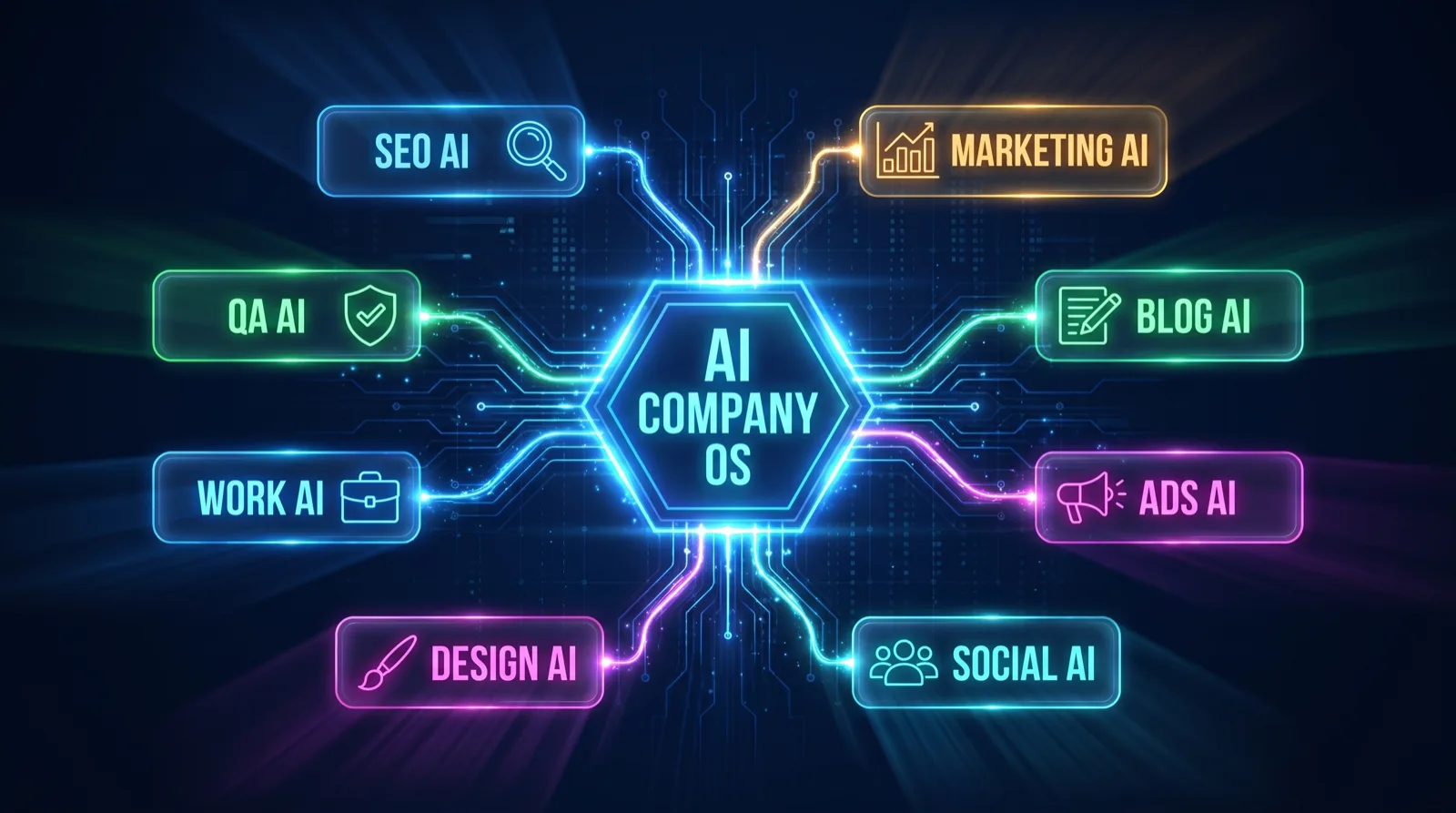
The system organizes 40-plus agents into 8 departments: Marketing (8 agents), Blog (8), SEO (8), Ads (8), Work (3), Social (3), Design (3), and QA. Each department has a defined specialty, a daily and weekly task table, and documented handoffs to other departments — the same shape a real staffed agency uses for its org chart, just written for AI agents instead of humans.
The Blog department is the most fully-built example, and it’s the one I lean on hardest. Its 8 agents are Content Writer, Strategy Lead, Research Analyst, Media Producer, Quality Editor, AI Search Specialist, Multilingual Manager, and Distribution Manager. Each one owns a narrow slice of the publishing pipeline instead of one agent trying to do everything badly.
One thing I want to be upfront about: dev — Superpowers, Context7, Claude-Mem — is infrastructure, not a client-facing department. It’s debugging discipline and session memory, the plumbing everything else runs on. I don’t count it toward the “8 departments” total, because it isn’t staffed the same way and it doesn’t have client deliverables.
A Day Inside the Blog Department
Here’s what a single morning actually looks like. The Content Writer drafts one new article using a research packet the Research Analyst assembled the day before. The Quality Editor scores that draft against a 100-point rubric before it goes anywhere near publish. The AI Search Specialist runs a citation-readiness audit so the post has a shot at being quoted by ChatGPT or Perplexity, not just ranked by Google. Then the Distribution Manager repurposes the finished piece into two or three other formats.
That’s four handoffs before breakfast, and I didn’t type a single one of those instructions this morning — I wrote them once, months ago, into a markdown file.
How Do the Departments Hand Off Work to Each Other?
Every department document ends with a communication-flow diagram and an explicit handoffs section. In the Blog department, the Quality Editor passes decay and keyword-cannibalization data to the Strategy Lead, who turns it into next week’s topic priorities for the Content Writer — closing the loop without me sitting in the middle relaying messages.
The agency-master-team.md file is the cross-department entry point, the one document that ties all eight departments together. It defines six cross-team playbooks: New Client Onboarding, Weekly Client Report Loop, Content-to-Revenue Pipeline, Full Site SEO and Content Audit, Paid Ads Launch, and Monthly Client Deliverable. It also has an on-demand triggers table — ranking drop triggers an SEO audit, new client triggers the onboarding playbook — so specific events fire specific department chains automatically instead of me remembering to kick them off.
What’s the Operating Cadence — Daily, Weekly, Monthly?
Every active department runs a daily loop each morning: tracking-integrity checks, social content drafts, SEO scans, ad performance pulls. Every Monday, each department reviews decay and performance data to set the following week’s priorities in a weekly sync. In the first week of each month, the whole system runs a monthly deliverable cycle for client reporting.
The weekly sync is where the real intelligence lives. The Quality Editor’s site health report and the Research Analyst’s Google performance data are the two primary inputs that set next week’s priorities across every department — not my gut feeling about what needs attention, but two documented reports that get read every Monday whether I remember to open them or not.
Is that different from how a human agency runs its Monday standup? Barely. That’s kind of the point — I copied a management pattern that already worked and wrote it down for agents instead of people.
Is an AI Automation Agency Actually Different From an AI Employee Tool?
Unlike most “AI employee” platforms that wrap a chat interface around a model, this system runs on Claude Code’s native skill architecture, where every agent is a documented procedure for a real, inspectable skill — not a purchased persona behind an API you can’t see into. Taskade’s 2026 research on one-person companies found AI agent stacks now handle 80-85% of execution work at 2-5% the cost of a traditional hire (Taskade, “One-Person Company Software: The Solo AI Tool Stack,” 2026). That’s the trend I’m riding, but the mechanism is different from a subscription SaaS chatbot.
The skills that power this system live as files. I can open one, read exactly what it does, and edit it if it’s wrong. Try doing that with a black-box “AI employee” product — you get a settings panel, not a source file.
I’ll also say the honest part out loud, because a polished case study that hides its rough edges isn’t worth reading. Two of my department docs — Work and Social — were built from the installer’s plugin and source names, not a fully confirmed command list, because the installer only names the plugin packages, not every individual skill inside them. I’ve flagged that directly in the project’s own README rather than pretending everything is equally solid. The Blog, SEO, Marketing, and Ads departments are built from confirmed, enumerable skill names; two aren’t there yet.
| AI Company OS | Typical AI Employee SaaS | |
|---|---|---|
| Transparency | Skills are readable markdown/code files | Closed persona behind an API |
| Cost | Cost of the underlying AI tool subscription | Monthly per-seat SaaS fee |
| Portability | Runs anywhere Claude Code runs | Locked to one vendor’s platform |
| Customization | Edit the skill or the playbook directly | Limited to vendor’s configuration options |
For the strategic thinking behind it, see AI as a Business Tool, Not a Dependency, which lays out the Teach and Build method this whole system runs on.
What Should You Build First If You Want to Try This?
Start with one department, not eight. Pick whichever function is draining the most hours each week — for most solo operators, that’s blog content or SEO reporting — install just that skill group with the --only flag, and run it daily for two weeks before you touch anything else.
Install, restart Claude Code, confirm with /plugin, then run that one department’s daily task manually a few times before you let it run unattended. Adapt the client-specific pieces — brand voice, taxonomy, playbook details — rather than copying mine verbatim; they’re written for my agency, not yours. You’ll know you’re ready to expand to a second department when the first one stops needing manual correction most mornings.
I didn’t build all eight departments in one sitting. Blog came first, because content was eating the most hours of my week. SEO came next, once Blog stopped needing daily babysitting. The rest followed over months, not a weekend.
Frequently Asked Questions
What is an AI Company OS?
An AI Company OS is an installer plus a set of operational playbooks that turn individual AI skill plugins into coordinated departments, each with daily and weekly cadences and documented handoffs, so one person can produce agency-scale output.
What’s the difference between Claude Code skills and Claude Code plugins?
A skill is a single capability file — a SKILL.md defining one task. A plugin is how skills get packaged, versioned, and distributed as an installable group, so one plugin install can add dozens of related skills at once.
Can one person really run an AI automation agency alone?
Increasingly, yes. Taskade’s 2026 research on one-person companies found AI agent stacks now handle 80-85% of execution work at 2-5% the cost of a traditional hire, freeing the operator for strategy and client relationships instead of production (Taskade, 2026).
Do I need to be a developer to install this?
No coding is required to run the installer itself, but you do need basic comfort with a terminal and git. The design skill group additionally requires Node.js 22.12 or newer.
How is this different from an AI agent marketplace?
Marketplaces sell individual skills one at a time. An AI Company OS sits on top of a marketplace’s output — it documents which skills to run in what order, on what cadence, and how each one’s output feeds the next.
The Takeaway
An AI Company OS isn’t a new model or another subscription. It’s an org chart, written down for skills you probably already have access to. The unlock isn’t any single agent — it’s the handoff documentation connecting them, the part almost nobody bothers to write.
If you’re running solo and drowning in the operational side of the business, that documentation is the highest-leverage hour you’ll spend this month.
If you want help building something like this — or just need a WordPress site and content strategy that doesn’t require an eight-department AI system — get in touch.
Sources:
- Claude Code, Anthropic, product documentation, retrieved 2026-08-01
- Pragmatic Engineer Survey, February 2026, AI coding tool adoption data, retrieved 2026-08-01
- Taskade Blog, “One-Person Company Software: The Solo AI Tool Stack,” 2026, retrieved 2026-08-01
Stay Updated
Get weekly AI insights and updates delivered to your inbox

Clifton T. Canady
WordPress Developer • AI Trainer • Content Strategist • Speaker
I help entrepreneurs and businesses build powerful digital presences through custom WordPress development, AI-driven content strategy, and engaging presentations. With 10+ years of experience, I blend technical expertise with StoryBrand messaging to create solutions that actually move the needle.
Related Articles

Portfolio-Focused AI Training Gets You Hired Faster Than Bootcamps
Portfolio-focused AI training gets you hired faster. Compare bootcamps vs. online learning. See why portfolio training produces better outcomes—backed by 2025 data.

The Real Barrier to Breaking Into AI (And It's Not Your Non-Technical Background)
You don't have a technical background? That's not your barrier. Here's what actually stops non-technical people from breaking into AI—and how to overcome it.

AI as a Business Tool, Not a Dependency: Building Sustainable AI Strategy
Learn how to use AI as a strategic business tool without creating dependency. The Teach and Build method aligns AI implementation with real business goals.